XYZ
XYZ adds virtual channels to the fixtures.
Requirements:
- Patch fixtures that have pan and tilt attributes.
For more information on patching see Adding fixtures to your show.
Activate XYZ in fixture types:
- Press Setup.
The main menu opens. - Tap Patch & Fixtures Schedule.
The dialog Edit Setup opens. - Tap Fixture Types on the right of the window.
The dialog Fixture Types opens. - Tap and hold a grayed out cell in the column XYZ.
-or-
Tap a grayed out cell in the column XYZ and then tap Enable XYZ. - XYZ is now enabled and the cell displays On.
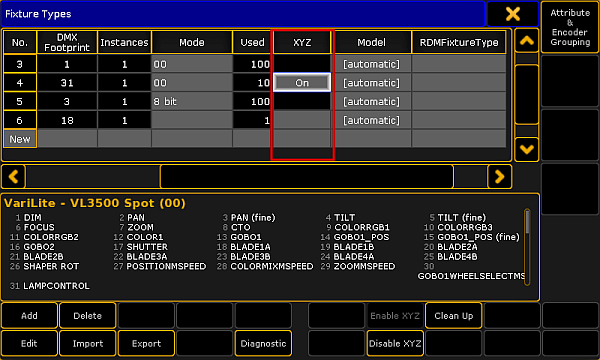
Enable XYZ
- To save the changes in the Patch & Fixture Schedule, close the dialog Fixture Types:
-Tap in the upper right corner of the dialog.
-The dialog Edit Setup appears.
-Tap in the upper right corner of the dialog.
-A warning pop-up appears.
-Tap Yes. - The changes are now saved.
- Select fixtures.
- Tap Position in the preset control bar.
For more information see Preset control bar. - Tap the feature Position below the preset Position.
-If you tap Position, the button toggles between the features Position, Stage A, and Stage B. - Adjust the attributes of Stage A for example.
-Tap X and the calculator opens.
-Type the value for the x-coordinate or select a preset on the right of the calculator. - The values are now adjusted.
Virtual Channels
Section titled “Virtual Channels”If XYZ is enabled, the following virtual channels are added to the fixtures:
- Stage (X):
X is the horizontal direction on the stage. - Stage (Y):
Y is the direction that runs toward or away from the audience. - Stage (Z):
Z is the vertical direction on the stage. - Flip:
Is the parameter to select the flip position. This parameter switches over between the flip modes:
Auto flip, Center, and No tilt flip.
Auto flip: Fixture can automatically flip to reach the required XYZ position. It uses both axes to flip, pan, and tilt.
No tilt flip: The fixture uses the pan axis only.
Center: The fixture flips the same amount of times in each direction. That is, the flip value is 0. - Mark:
Sets the stage marker the beam of the fixture is to point at. - Pan:
Fixture moves in the horizontal direction. - Tilt:
Fixture moves in the vertical direction. - Dist:
Is the distance between the point that the beam of the fixture points at and the fixture itself. Dist is used when converting pan and tilt to XYZ and vice versa. - PosMode:
Switches over between the XYZ and pan/tilt values.
For information on different combinations of pan/tilt see the Flip keyword.