Keyboard shortcuts
Important:
1. Keyboard shortcuts are only available on a grandMA2 onPC.
2. Keyboards that have a different keyboard layout, as opposed to German keyboards, do not support all default keyboard shortcuts.
If this should be the case with your keyboard, adjust the shortcuts affected. To transfer these to other show files and/or stations, use the Import/Export function. For more information on how adjust the shortcuts see export or import keyboard shortcuts.
The go to the keyboard shortcuts press the Setup and under tab Console tap Edit Keyboard Shortcuts.
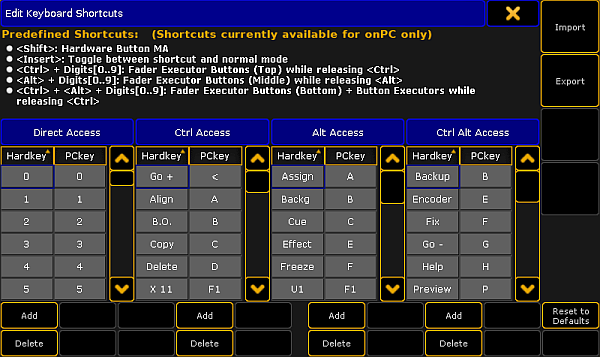
Edit Keyboard Shortcuts window
The following tables displays the default grandMA2 onPC keyboard shortcuts.
Shortcuts for command area keys
Section titled “Shortcuts for command area keys”| Key | Shortcut |
|---|---|
| Blind | B |
| Freeze | Alt + F |
| Prevw | Ctrl + Alt + P |
| Assign | Alt + A |
| Align | Ctrl + A |
| U1 | Alt + F1 |
| U2 | Alt + F2 |
| U3 | Alt + F3 |
| U4 | Alt + F4 |
| Fix | Ctrl + Alt + F |
| Select | Ctrl + S |
| Off | O |
| Temp | Ctrl + Alt + T |
| Top | Alt + T |
| On | Ctrl + O |
| <<< | Alt + < |
| Learn | Ctrl + L |
| >>> | Ctrl + Alt + < |
| Small Go - | < |
| Small Pause | Ctrl + P |
| Small Go + | Ctrl + < |
| View | V |
| Effect | Alt + E |
| Goto | Alt + G |
| Page | Alt + P |
| Macro | M |
| Preset | P |
| Sequ | Alt + S |
| Cue | Alt + C |
| Exec | X |
| Channel | C |
| Fixture | F |
| Group | G |
| Delete | Ctrl + D |
| Move | Ctrl + M |
| Copy | Ctrl + C |
| Full | Ctrl + F |
| Highlt | H |
| Solo | Ctrl + Alt + S |
| Backg | Alt + B |
| User1 | Ctrl + U |
| User2 | Alt + U |
| Time | Ctrl + T |
| Esc | Esc |
| Edit | E |
| Oops | Backspace |
| Update | U |
| Clear | Delete |
| List | L |
| Store | S |
 | Shift |
| Please | Enter |
| . | . |
| If | I |
| At | A |
| Thru | / (number pad) |
| + | + |
| - | - |
| 0 | 0 |
| 1 | 1 |
| 2 | 2 |
| 3 | 3 |
| 4 | 4 |
| 5 | 5 |
| 6 | 6 |
| 7 | 7 |
| 8 | 8 |
| 9 | 9 |
| Up | Arrow up |
| Down | Arrow down |
| Prev | Arrow left |
| Next | Arrow right |
| Set | End |
 | Ctrl + Alt + E |
Shortcuts for menu keys
Section titled “Shortcuts for menu keys”| Key | Shortcut |
|---|---|
| Tools | Ctrl + F12 |
| Setup | F12 |
| Backup | Ctrl + Alt + B |
| Help | Ctrl + Alt + H |
Shortcuts for X-keys
Section titled “Shortcuts for X-keys”| Key | Shortcut |
|---|---|
| X1 | F1 |
| X2 | F2 |
| X3 | F3 |
| X4 | F4 |
| X5 | F5 |
| X6 | F6 |
| X7 | F7 |
| X8 | F8 |
| X9 | F9 |
| X10 | F10 |
| X11 | Ctrl + F1 |
| X12 | Ctrl + F2 |
| X13 | Ctrl + F3 |
| X14 | Ctrl + F4 |
| X15 | Ctrl + F5 |
| X16 | Ctrl + F6 |
| X17 | Ctrl + F7 |
| X18 | Ctrl + F8 |
| X19 | Ctrl + F9 |
| X20 | Ctrl + F10 |
Shortcuts for master section keys
Section titled “Shortcuts for master section keys”| Result | Shortcut |
|---|---|
| Ch Pg+ | Alt + PgUp |
| Ch Pg- | Alt + PgDown |
| Fd Pg+ | PgUp |
| Fd Pg- | PgDown |
| Bn Pg+ | Ctrl + PgUp |
| Bn Pg- | Ctrl + PgDown |
| Large Pause | Alt + Space |
| Large Go- | Ctrl + Space |
| Large Go | Space |
Shortcuts for grandMA2 onPC screen buttons
Section titled “Shortcuts for grandMA2 onPC screen buttons”| Result | Shortcut |
|---|---|
| Extern 1 | Ctrl + Alt + F5 |
| Extern 2 | Ctrl + Alt + F6 |
| Executor 1 - 15, 101 - 115 | Ctrl + Alt + F7 |
| Executor 16 - 30, 116 - 130 | Ctrl + Alt + F8 |
| Screen 2 | Ctrl + Alt + F2 |
| Screen 3 | Ctrl + Alt + F3 |
| Screen 4 | Ctrl + Alt + F4 |
Reset keyboard shortcuts to defaults
Section titled “Reset keyboard shortcuts to defaults”To reset the keyboard shortcuts to their defaults:
- Click Setup and then under tab console click Edit Keyboard Shortcuts.
The Edit Keyboard Shortcuts window opens. - Click Reset to Defaults.
The keyboard shortcuts are reset to their defaults.