Edit groups
This topic describes the different group settings and how to edit the groups.
You can edit the following option:
Group Name
Section titled “Group Name”You can change the group name of every group except Trunk and Manage. For a better overview every group name is displayed in a different color.
Important:
The group name is a label for better overview and does not affect the VLAN.
IGMP Snooping
Section titled “IGMP Snooping”IGMP snooping avoids ports to be flooded with undesired multicast packets.
It is a smart way to manage multicast packets, and forward them to the registered ports.
IGMP snooping is disabled by default.
Hint:
To forward only known multicast network packets, enable IGMP Snooping and IGMP Querier. Disable unknown flooding.
IGMP Querier
Section titled “IGMP Querier”Important:
IGMP snooping requires at least one switch in a group (VLAN) to act as a querier to ensure IGMP snooping functionality.
Querier register the multicast packets to the corresponding ports.
If more than one querier is activated per group, the switch with the lowest IP address will be elected as querier.
This election process is automated.
IGMP querier is disabled by default.
Unknown Flooding
Section titled “Unknown Flooding”Unknown flooding is for multicasted frames destined for an address for which the switch has not seen a join.
In that case the switch uses the flooding mask to forward that frame to every port.
Unknown flooding can be global enabled or disabled for all groups.
By default, unknown flooding is enabled.
- Yes = All unknown packages will be forwarded
- No = All unknown packages will be dropped
Hint:
To forward only known multicast network packets, enable IGMP Snooping and IGMP Querier. Disable unknown flooding.
VLAN ID
Section titled “VLAN ID”All groups of the switch have a default VLAN ID, except Trunk.
If you implement the switch in an existing network, it can be necessary to change the VLAN ID of the groups.
You can change the VLAN ID of group 1 through group 6. The VLAN ID of group 8 (= manage group) is 1 and fixed.
Possible VLAN IDs are from 1 to 4094.
| Group | Default VLAN ID |
|---|---|
| 1 | 100 |
| 2 | 200 |
| 3 | 300 |
| 4 | 400 |
| 5 | 500 |
| 6 | 600 |
Important:
If you change the VLAN ID of a group, you need to change the VLAN ID of each switch using this group.
The VLAN IDs of the groups which should communicate to each other, have to be the same.
If the VLAN IDs of groups are not the same, they do not communicate with each other.
Edit Groups
Section titled “Edit Groups”Requirement: Added MA Network Switch to the network configuration.
To edit groups:
-
Open the MA Network Configuration.
- Press Setup, and tap under Network MA Network Configuration.
The MA Network Configuration window opens. -
Tap at Network Switch.
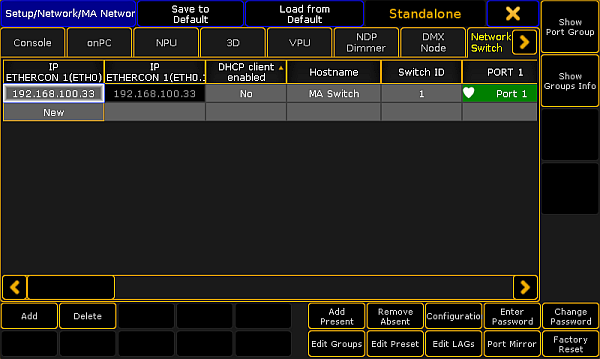
MA Network Configuration - Network Switch
-
Tap at a cell in the row of the MA Network Switch you like to edit and tap Edit Groups.
The Configure Switch Groups pop-up opens.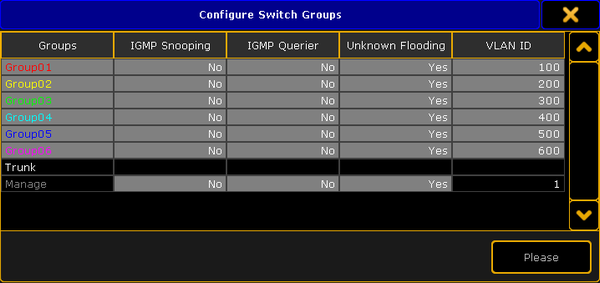
Configure Switch Groups pop-up
-
Tap and hold the cell you like to edit or tap in the cell and press the screen encoder.
-
Edit the group and press Please or tap Please.
The groups are configured and the changes are saved in the startup configuration.