Set
The key Set is located in the command area below the key Up.
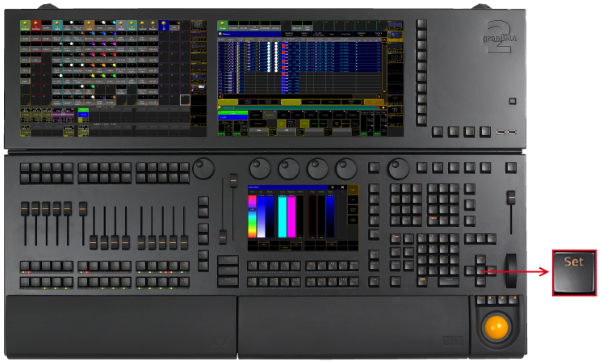
_Location __Key __Set _
Key Set as the Key Enter
Section titled “Key Set as the Key Enter ”If a pop-up dialog is open, for example the pop-up Choose store method, the key Set has the function of the key Enter.
- Pressing Set confirms the selected button in the pop-up.
Key Set and MAtricks
Section titled “Key Set and MAtricks”- Pressing Set enables and disables the MAtricks settings.
[time] : Executing : MAtricks Toggle
If the MAtricks button is green, the MAtricks are enabled.

Encoder Bar - Enabled MAtricks
- Pressing and holding Prev + Set executes the MAtricksInterleave -.
[time] : Executing : MAtricksInterleave -
- Pressing and holding Next + Set executes MAtricksInterleave +.
[time] : Executing : MAtricksInterleave +
- Pressing and holding
 + Prev + Set executes MAtricksBlocks -.
[time] : Executing : MAtricksBlocks -
- Pressing and holding + Next + Set executes MAtricksBlocks +.
[time] : Executing : MAtricksBlocks +
For more information see MAtricks.
Key Set for Adjustment of Monitor Wing Angle
Section titled “Key Set for Adjustment of Monitor Wing Angle”To manually adjust the monitor wing angle, release the torque of the monitor wing engine.
- Pressing and holding + Set.