Next
Important:
If you type the Next keyword in the console, by press the Next key, the keyword will be directly executed.
You can also use the command line along with the keyboard and type the word Next in.
To get the Next keyword in the command line and directly execute it, press Next.
You can also type Next or the shortcut N in the command line.
Description
Section titled “Description”If no fixtures or channels are selected and the default keyword is Fixture or Channel, the Next keyword selects the fixture with lowest fixture or channel ID.
If only one fixture selected and the default keyword is Fixture or Channel, the Next keyword selects the fixture with the next fixture or channel ID.
If multiple fixtures or channels are selected, the Next keyword selects the next fixture or channel in the selection order.
For more information, see MAtricks.
Syntax
Section titled “Syntax”Next
Example
Section titled “Example”- To step thru the fixtures of the fixture selection in the selection order, press Next.
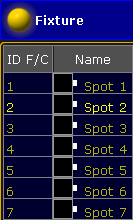
Fixture selection is fixture 1 thru 7, current selected with next is fixture 2