Timer
To get the Timer keyword in the command line, press and hold  + Macro (= Timer).
You can also type Timer in the command line.
Description
Section titled “Description”With the Timer keyword you can edit, start, pause, restart, switch off, select, lock, unlock, and assign timers.
Timer 1 is a predefined stopwatch and not editable.
For more Information see Timer pool.
The Timer keyword is an object keyword.
Syntax
Section titled “Syntax”[Function] Timer [ID]
Assign Timer [ID] / [Parameter] = [Parameter Value]
Parameter
Section titled “Parameter”The following table displays the assignable parameters via command line.
| Parameter | Parameter Value |
|---|---|
| Name | ”Timername” |
| TimerMode | ”Stopwatch”, “Countdown” |
| WhenRestarting | ”Continue”, “Reset” |
| TimeUnit | ”Seconds”, “1/10 Seconds”, “1/100 Seconds”, “24 FPS”, “25 FPS”, “30 FPS” |
| ExecTrigger | ”LinkSelected-Start”, “Not Linked”, “LinkLastGo-Start”, “LinkSelected-Toggle”, “LinkLastGo-Toggle” |
| AlertType (only if timer mode is countdown) | “None”, “Popup”, “Popup & Beep”, “Command”, “Command & Popup”, “Command, Popup & Beep” |
| AlertRange (only if timer mode is countdown) | “Local”, “Global” |
| Countdowntime (only if timer mode is countdown) | 0.01S .. 23H59M59.99S |
Examples
Section titled “Examples”- Edit timer 4. The Edit Timer pop-up opens.
[Channel]> Edit Timer 4
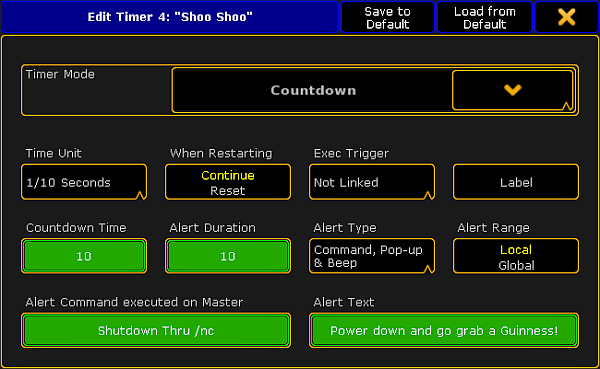
Edit the timer Countdown
- Assign a countdown time of 20 seconds to the existing timer 4.
[Channel]> Assign Timer 4 /countdowntime = 20