Slash /
To get the slash / in the command line, press / .
Description
Section titled “Description”The slash separates entered object properties or parameter options.
The slash along with the function ChangeDest**** changes the destinations to the root level. For more information, see ChangeDest keyword.
The slash along with a keyword and a question mark displays all available options to the keyword in the command line feedback window.
Syntax
Section titled “Syntax”[keyword] /?
Assign [object-list] /parameter = parameter value
[commandline-syntax] /option1 /option2 /option3 = value
Examples
Section titled “Examples”To display the available options to the copy keyword in the command line feedback window:
1. Type in the command line:
[Channel]> Copy /?
2. Press Please.
The copy options are displayed in the command line feedback window.
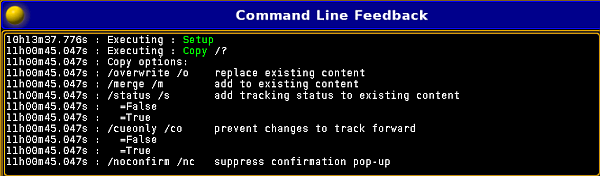
Figure 1: Command line feedback window - copy options
To change the parameters for cue 5 on the selected executor:
1. Type in the command line:
[Channel]> Assign Cue 5 /mib = early /trig = follow
2. Press Please.
The parameters are assigned to cue 5 on the selected executor.
To exit the structure tree and go back to the root level:
1. Type in the command line:
[Edit Setup/Universes]> CD /
2. Press Please.
You are back in the root level.