Version
To go to the version keyword, type Version in the command line or use the shortcut Ve.
Description
Section titled “Description”The version keyword gives you access to version details of the console or software in the commandline feedback window.
It displays the following details.
- version number
- build date
- build time
- vhash
- showfile
- showpath
- current user
- parameter count
The version keyword is a function keyword.
Syntax
Section titled “Syntax”Version
Example
Section titled “Example”To see the version details of the console or the software.
- Type Version in the command line and press Please.
[Channel]> Version
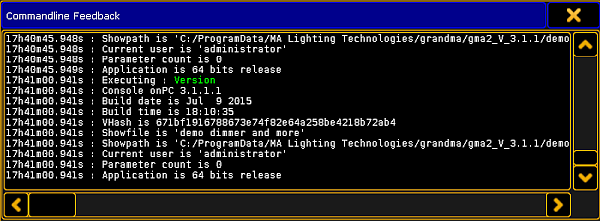
Version details in the commandline Feedback pop-up
The version details are displayed in the commandline feedback pop-up.