Create presets
Requirement:
- Fixtures are patched.
For more information on how to patch fixtures see Adding fixtures to your show.
To create presets:
- Select fixtures.
- Assign values to fixtures.
- Press and hold Store until the pop-up Temporary **Store Options **opens.
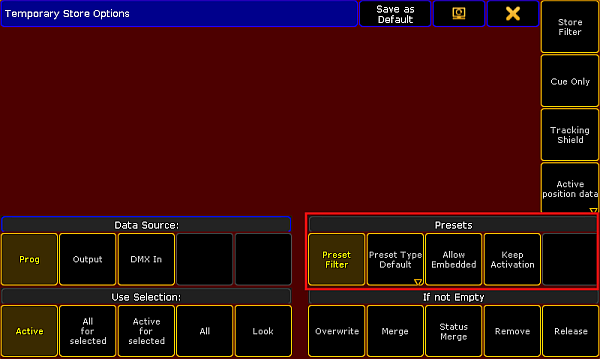
Temporary store options
- Enable the buttons marked by the red box in the screenshot above.
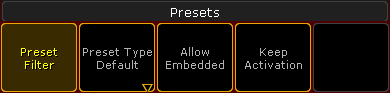
Presets – store options
- To disable the filter, tap Preset Filter.
Important:
Every preset pool – except for the preset pool All – has a filter as a default setting. This filter allows to store the value equivalent to the pool only.
- To choose the store option of the preset type, tap Preset Type Default and then toggle between default, selective, global or universal.
Important:
The store option is Preset Type Default by default. This setting falls back on the default store option of a preset pool.
- To allow that presets are stored within other presets, tap Allow Embedded.
For more information see Embedded presets. - To take the preset link actively into the programmer after storing the preset, tap Keep Activation.
- To keep the previous settings when storing another preset, tap Save as Default in the header of this dialog.
- To close the Temporary Store Options, tap
 in the upper right corner of the pop-up.
 - Eventually, tap an empty object you would like to store the preset to.