Pools in General
This chapter describes pools in general. Pools are windows that display objects in the show file.
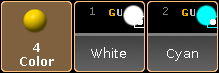
Preset pool – Color
To open a pool see workspace - manage windows.
There are 19 different pools. For information on specific pools click on one of the following links.
- Camera Pool
- Effects Pool
- Filters Pool
- Forms Pool
- Groups Pool
- Images Pool
- Layout Pool
- Macros Pool
- Masks Pool
- MAtricks Pool
- Page Channels Pool
- Pages Exec Pool
- Sequence Pool
- Timecode Pool
- Timecode Slots Pool
- Timer Pool
- Views Pool
- Universes Pool
- Worlds Pool
To navigate in the pool, use the arrow keys on the keyboard in the drawer of the console or on a external keyboard.
Pool objects
Section titled “Pool objects”Every pool contains pool objects.
Every pool object with content has a brighter frame compared to an empty pool object.
The first pool object tile displays the name of the pool. If the focus is set to a pool, the first pool tile is blue.
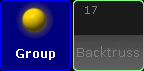
Group pool with focus
The number in the upper left corner of a pool object is the pool object number.
A pool displays at least a full screen of pool object tiles, for example 127 pool object tiles on screen 2 of a grandMA2 console. If the empty object tiles do not exceed 100, a further page with empty object tiles will be added. In total, there are 9999 object tiles per pool.
Hint:
To expand the group pool for example by 1000 empty pool object tiles, type into the command line:
- Store Group 1000 and press Please
- Delete Group 1000 and press Please
The group pool is expanded by empty group pool objects.
For information about the pool object colors see workspace - colors - system.