Time
The key Time is located in the command area on the left of the key Esc.
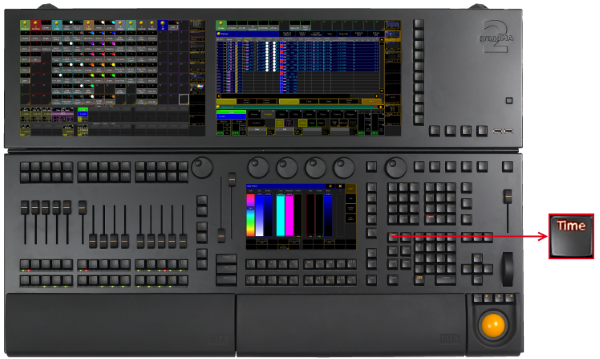
_Location __Key __Time _
-
Pressing Time enters the Fade keyword into the command line and changes the encoder bar to Fade.

Encoder Bar Fade
[Channel]> Fade
-
If Auto is selected in the layer control bar of the fixture or channel sheet, pressing Time changes to the Fade Layer.

Layer Control Bar - Fade Layer
-
Pressing Time Time enters the Delay keyword into the command line and changes the encoder bar to Delay.

Encoder Bar Delay
[Channel]>Delay
-
If Auto is selected in the layer control bar of the fixture or channel sheet, pressing Time Time changes to the Delay Layer.

Layer Control Bar - Delay Layer
-
Pressing and holding Time for about 2 seconds changes the encoder bar to Value.

Encoder Bar Value
-
If Auto is selected in the layer control bar of the fixture or channel sheet, pressing and holding Time for about 2 seconds changes to the Values Layer.

Layer Control Bar - Values Layer
If you enter Store or Assign keyword into the command line,
- pressing then Time enters the Fade keyword into the command line.
[Channel]> Store Fade
- pressing then Time Time enters the OutFade keyword into the command line.
[Channel]> Store OutFade
- pressing then Time Time Time enters the Delay keyword into the command line.
[Channel]> Store Delay
- pressing then Time Time Time Time enters the OutDelay keyword into the command line.
[Channel]> Store OutDelay
- pressing Time Time Time Time Time enters the SnapPercent keyword into the command line.
[Channel]> Store SnapPercent
- pressing then Time Time Time Time Time Time enters the CmdDelay keyword into the command line.
[Channel]> Store CmdDelay
-
Pressing and holding
 + Time opens the Effect Layer in the encoder bar.

Encoder Bar - Effect Layer
-
Pressing and holding
+ Time again, changes to the next Effect Layer.
-
If Auto is selected in the layer control bar of the fixture or channel sheet, pressing and holding
+ Time changes to the next Effect Layer.

Layer Control Bar - Effect Layer