Connect external screens
You can connect up to two external screens or touch screens on a console – right and left.
Information:
We recommend ELO touch screens with the following specifications:
- Certification: Microsoft WIN8 compliant
- Connectivity: A USB interface
- Video Interface: VGA or DVI or HDMI
- Resolution: Monitors are to have a minimum resolution of 1024x768.
Requirement:
- Console is turned off
- DVI cable
Information:
If the external screen has a VGA connector, a DVI adapter is necessary for VGA.
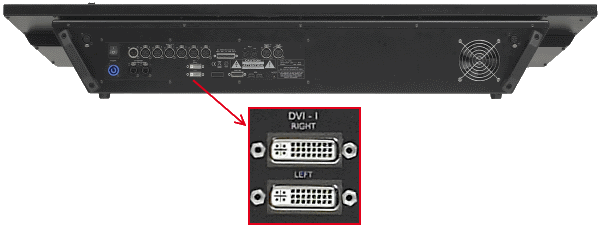
DVI connectors for external screens
- Connect the DVI cable for the right external screen with the Right DVI-I connector.
- Place the external screen on the right, above the internal screen 2.
The screen number for the external screen on the right is 5. - Connect the DVI cable for the left external screen with the Left DVI-I connector.
- Place the external screen on the left, beside the external screen on the right.
The screen number for the external screen on the left is 6. - Connect power to the external screens.
The external screens are connected.
For more information see change screen options.