Embedded presets
Embedded presets are stored within other presets.
To create embedded presets:
- Select fixtures in the fixture sheet.
- Assign a preset to the fixtures selected.
- Assign an additional preset to these fixtures.
- Press and hold Store.
- The dialog Temporary Store Options opens.
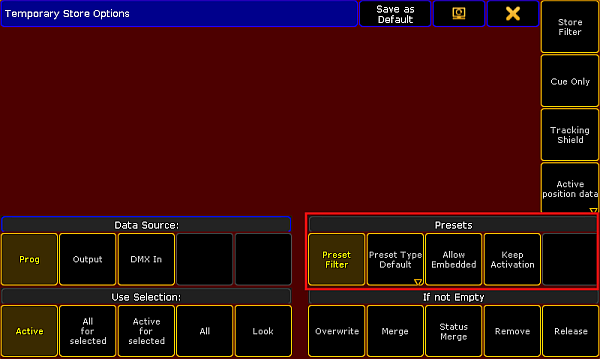
Presets – Temporary store options
- To create an embedded preset, tap Allow Embedded.
- Then, tap an empty store object in the preset pool where the embedded preset is to be stored.
- To close the dialog, tap
 in the upper right corner.
Example
Section titled “Example”This example demonstrates an embedded preset based on a color, position and gobo preset.
- Select fixtures.
- Assign a color, position and gobo preset to these fixtures.
- Press and hold Store.
- The pop-up Temporary Store Options opens.
- Tap Allow Embedded.
- To store the embedded preset in the preset pool All, tap an empty pool object in this preset pool.
Hint:
If you update one of the presets selected for the fixtures, the embedded preset will automatically be updated as well.
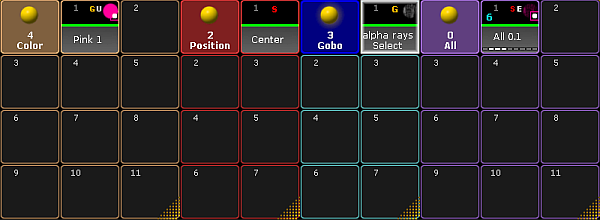
Embedded preset in the pool All
- You have now created an embedded preset marked by a white E within the object.