Add Window
Windows are added to the user definable areas on the screens.
The best way to add a window is by tapping inside an empty screen area. The window is added with the new window’s upper left corner, where the screen is tapped.
Another option is to tap and draw a square on the empty screen to define the window size.
Tap the screen to open the Add Window pop-up:
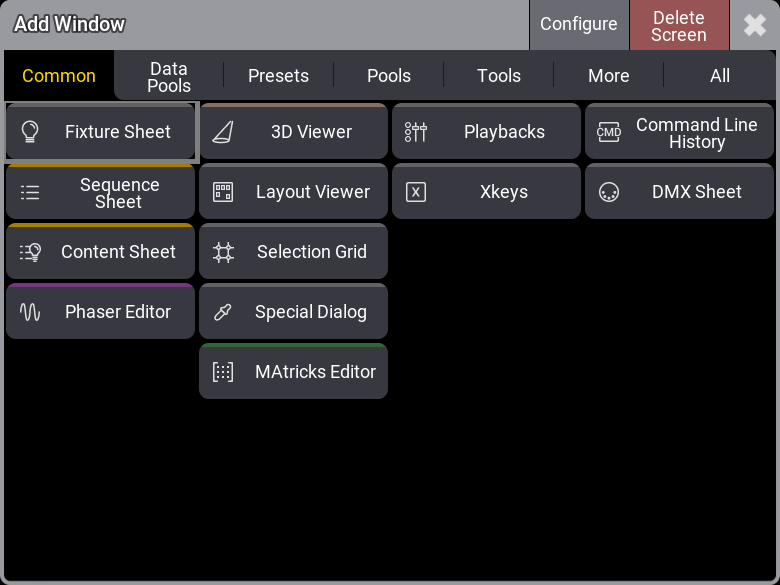
Tap a button with the desired window to create it
Windows are divided into tabs: Common, Data Pools, Presets, Pools, Tools, More, and All. Tapping the different tabs reveals buttons with windows for each section.
Tap the desired button to create the window. This creates a new window. By default, the first stored preferences of a window are loaded. This applies to all windows except pool windows.
The pop-up’s title bar has two buttons. The red Delete Screen button removes all windows from the screen.
The Configure button opens the Configure Display pop-up. This can be used to customize some settings regarding tools on the side of the display and change the size of the user area. Read more in the Configurations of Displays topic.
List of current windows that can be created using the Add Window pop-up:
Common
Section titled “Common”A fixed selection of commonly used windows. (These windows are also represented in other tabs):
- Fixture Sheet
- Sequence Sheet
- Content Sheet
- Phaser Editor
- 3D Viewer
- Layout Viewer
- Selection Grid
- Special Dialog
- MAtricks Editor
- Playbacks
- Xkeys
- Command Line History
- DMX Sheet
Data Pools
Section titled “Data Pools”All object pools that are part of a data pool:
- Bitmaps
- Executor Configurations
- Filters
- Generators
- Groups
- Layouts
- Macros
- MAtricks
- Pages
- Plugins
- Quickeys
- Sequences
- Timecodes
- Timers
- Worlds
Presets
Section titled “Presets”All preset pools:
- Dynamic
- All 1
- All 2
- All 3
- All 4
- All 5
- Dimmer
- Position
- Gobo
- Color
- Beam
- Focus
- Control
- Shapers
- Video
All pools that are part of the show data or the user profiles:
Show Data:
Media:
User Profile:
General windows for displaying show data:
Sheets:
Programmer Tools:
Viewers and Editors:
- 3D Viewer
- Agenda Viewer
- Clock Viewer
- Layout Viewer
- MAtricks Editor
- Phaser Editor
- RDM Devices Viewer
- Sound Viewer
- Timecode Viewer
All different bars, playback windows, or info and system-related windows:
Bars:
Playback:
Info and System:
The All tab contains all windows in an alphabetical list that can be filtered and sorted.