Quick Start
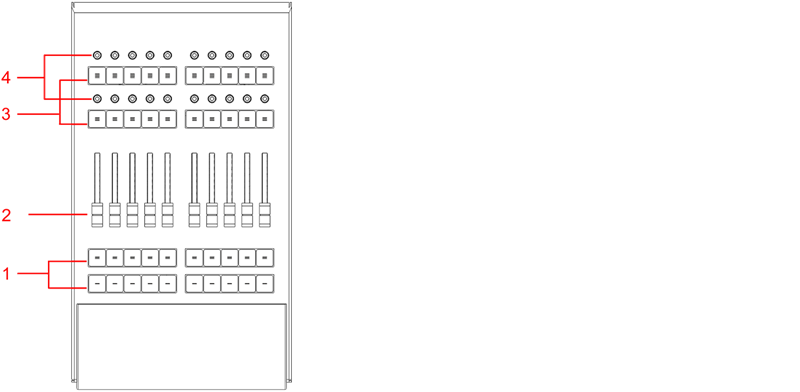
_grandMA3 onPC fader wing front panel _
- Executor buttons 101-190 + 201-290
- Executor faders 201-290
- Executor buttons 301-390 + 401-490
- Executor knobs 301-390 + 401-490
For more information about executors, see Executor elements.

grandMA3 onPC fader wing rear panel
- DMX A+B
- USB
- Power switch
- IEC connector
- Desk light
- Kensington lock
Connect and Power Up the Device
Section titled “Connect and Power Up the Device”- Unpack the device.
- Remove the packaging and cushioning material.
- Place the device indoors on a stable surface.
- Download the grandMA3 onPC software on www.malighting.com
- Install the software on your PC or laptop. For minimum requirements see System Requirements grandMA3 in the grandMA3 user manual.
- Connect the grandMA3 onPC fader wing with your command wing XT, PC or laptop using a USB cable.
- Start the command wing XT, PC or laptop .
- Switch on the grandMA3 onPC fader wing:
-Insert the IEC connector into the corresponding jack.
-Connect the main power plug.
-Turn on the power switch:
-Set it to position I.
-The power switch lights up in red.
Turn off the grandMA3 onPC fader wing
Section titled “Turn off the grandMA3 onPC fader wing”To turn off the grandMA3 onPC fader wing set the power switch to position 0.
 | Important: -Show data is only saved in the grandMA3 onPC software. -For updates use the grandMA3 onPC software. |
| Important: You can disconnect the grandMA3 onPC fader wing using the grandMA3 onPC software. The DMX output will then be interrupted immediately. |
Different Combinations
Section titled “Different Combinations”| Device | Connected To | Parameters |
|---|---|---|
| grandMA3 onPC fader wing + | PC/laptop | 4 096 |
| grandMA3 onPC fader wing + | PC/laptop + grandMA3 onPC 8/4/2Port Node | 4 096 |
| grandMA3 onPC fader wing + | PC/laptop + grandMA3 processing unit M/L/XL | 4 096 |