Patch
To enter the **Patch **keyword in the command line, use one of the options:
- Type Patch
- Type the shortcut Pat
Description
Section titled “Description”The Patch keyword is used to edit the patch address of single fixtures or entire fixture selections.
Syntax
Section titled “Syntax”Patch Fixture [“Fixture_Name” or Fixture_Number] [Universe.Address]
Patch Fixture [“Fixture_Name” or Fixture_Number] Thru [“Fixture_Name” or Fixture_Number]
Examples
Section titled “Examples”- To patch fixture 2 to the patch address 123 on universe 3, type:
 | User name[Fixture]>Patch Fixture 2 3.123 |
- To edit the patch address of fixtures 1 through 10, type:
| User name[Fixture]>Patch Fixture 1 Thru 10 |
The Edit Patch opens:
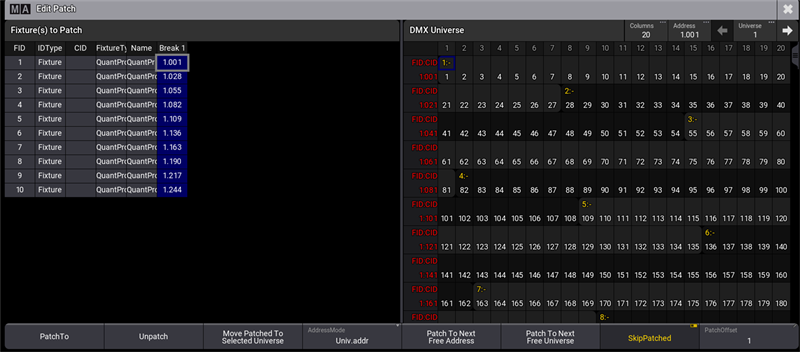
Edit patched fixtures
You can now patch the fixtures to a new patch address or unpatch them using the user interface.