Copy Cues
Cues can be copied to a new or existing cue.
The Copy keyword is needed for this operation. The general syntax is Copy Cue [“Cue_Name” or Cue_Number] At [“New_Cue_Name” or New_Cue_Number].
Different options define what and how the cue is copied. These options appear in a pop-up when the copy command is executed.
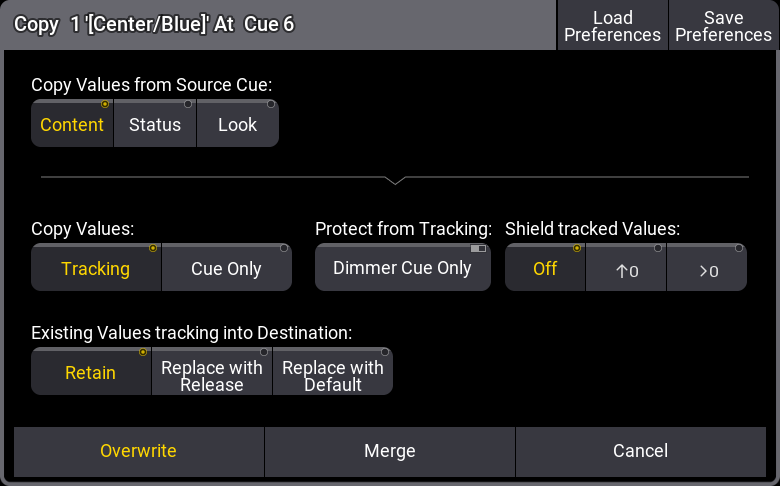
Copy cue pop-up
Copy values from Source Cue has three different radio buttons that are mutually exclusive:
- Content:
Copies only the values stored in the source cue. - Status:
Copies the status of the source cue. Status includes the values stored in the cue and all tracked values from former cues. - Look:
If the fixture’s dimmer attribute has a value status above 0% in the source cue, then the status values of all attributes in the source cue are copied.
If the fixture’s dimmer attribute has a value status of 0% in the source cue, then only the dimmer attribute is copied from the source cue.
This means that the current status of the dimmer value is always copied.
Copy Values defines**** how values should track through the sequence. There are two radio buttons:
-
Tracking:
The new values are added as normal tracking values and will track onward. -
Cue Only:
The new values are added using Cue Only. Attributes that do not have a previous value it can return to will store the default value in the following cue.Cue Only is a function that stores values at the destination, but also stores the previouslly tracked values in the following cue. The result is that following cue keeps the same look. Learn more about Cue Only in the Store Cues Topic.
A single option in the Protect from Tracking section is Dimmer Cue Only. Turning this On will store the dimmer attributes as Cue Only, but the other attributes can be stored as tracking using the other settings.
The Shield tracked Values have three options. It is about the Tracking Shield function. Learn more in the Tracking Shield topic. The options are:
- Off:
Tracking Shield is not used. - ↑0:
Protects attributes in the next cue where the dimmer value increases starting from zero. - >0:
Protects attributes in the next cue where the dimmer value is above zero
Existing Values tracking into Destination also has three mutually exclusive radio buttons. This setting defines what should happen with values that track into the new copied cue from previous cues.
- Retain:
The tracking values are kept and tracked into the new cue. - Replace With Release:
Tracking values are replaced with the “Release” special value. - Replace With Default:
Tracking values are replaced with the default value.