Groups
Groups in the MAtricks are used to separate the selection into the number of groups set.
It alternates through the selection, putting fixtures into each group.
It is best explained with an example.
Example - Ten Fixtures One Axis
Section titled “Example - Ten Fixtures One Axis”In this example, there are ten fixtures (1 through 10).
They are selected from 1 to 10 without any specific grid information. Highlight is activated.
Since there is no grid information, the fixtures are only on the X-axis.
Tap + in the X settings MAtricks window or press Next to make the MAtricks X value 1.

Ten fixtures with MAtricks X at 1 - No XGroup
It looks like this in the Selection Grid and Fixture Sheet (Channel SheetMode and Output layer selected) window.
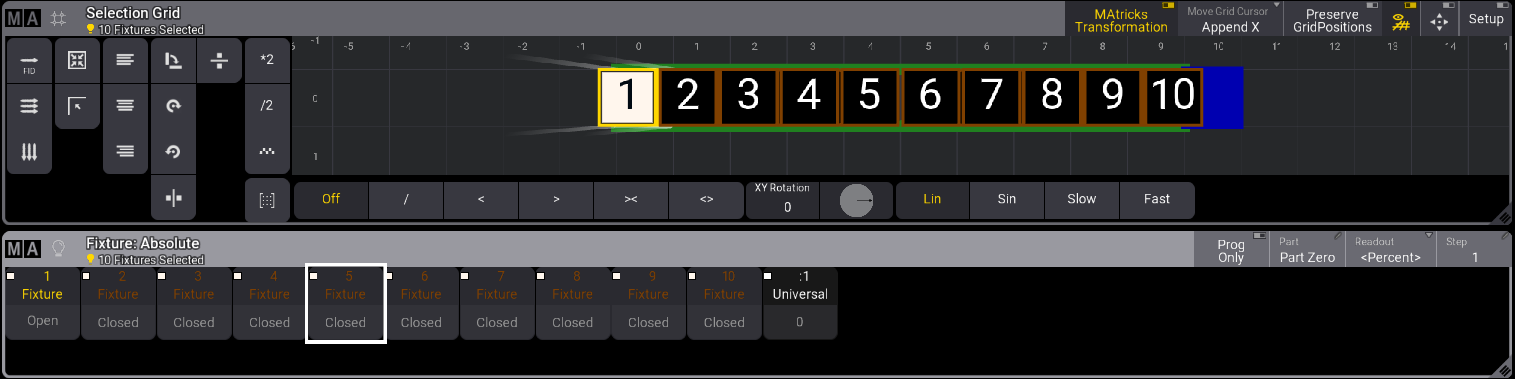
Ten fixtures with MAtricks X at 1 - No XGroup