Shuffle
Shuffle shuffles the selection order of the current fixture selection.
The shuffle function is described in more detail in the MAtricks and Shuffle topic.
This example uses the MAtricks window, the Selection Grid window, the Fixture Sheet window, the Group Pool, the Color Preset Pool, and the All 1 Preset Pool. It is helpful to have them visible on the screens.
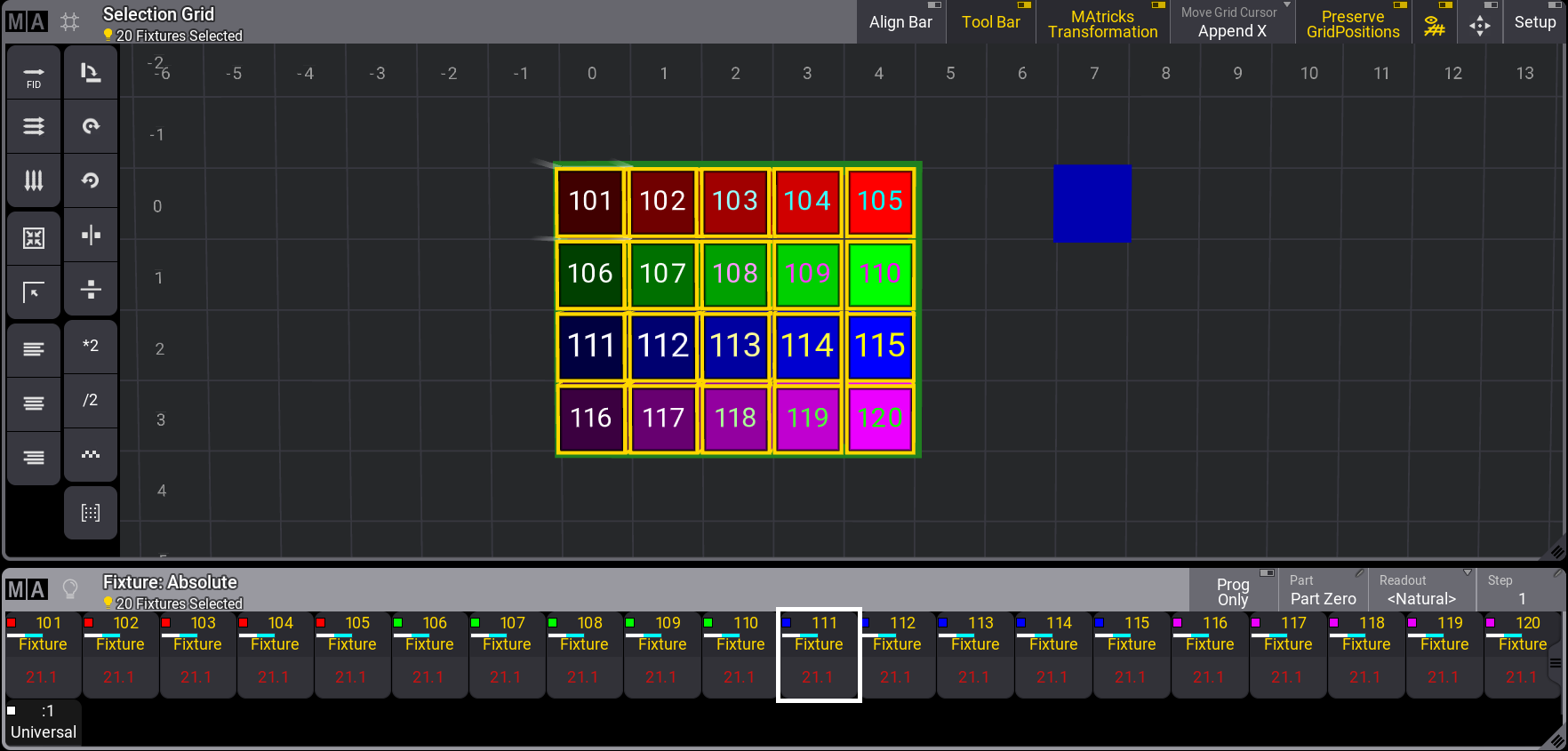
This is an example of a shuffle on two axes.
The main setup comprises 20 fixtures and four global color presets (Red, Green, Blue, and Magenta).
- Select fixtures 101 thru 105 and tap the red color preset.
- Select fixtures 106 thru 110 and tap the green color preset.
- Select fixtures 111 thru 115 and tap the blue color preset.
- Select fixtures 116 thru 120 and tap the magenta color preset.
- Select fixtures 101 thru 120.
- Use the MAtricks tool to set XWidth to 5. This arranges the fixtures nicely in a 5 x 4 grid.
- Store a group with this grid arrangement.
- A 25% to 100% dimmer range is applied by pressing At 2 5 Thru 1 0 0 Please.
- Press Store and tap an empty All 1 preset pool object.
It looks like this: