OSC
To enter the **OSC **keyword in the command line, use one of the options:
- Type OSC
- Type the shortcut Os
Description
Section titled “Description”The OSC keyword represents the open sound control data.
OSC keyword lists, exports or imports open sound control data in Remote Inputs.
Syntax
Section titled “Syntax”[Function] OSC
Examples
Section titled “Examples”1. List all OSC data in an interface
 | User name[Fixture]>ChangeDestination OSC |
Result:
| User name@ShowData/OSCBase> |
- To list OSC data in the interface, type:
| User name@ShowData/OSCBase> List |
2. Import OSC data in Remote Input
Requirement: Change destination to OSC.
For more information see Example 1.
- To import OSC data, type:
| User name@ShowData/OSCBase> Import |
If the target already exists, the import pop-up will appear asking you to choose an option:
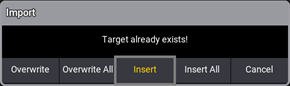
Target is occupied
- Choose an option.
The OSC is imported.