Version
To enter the Version keyword in the command line, use one of the options:
- Type Version
- Type the shortcut Ve
Description
Section titled “Description”The Version keyword is a function keyword which is used to grant access to details of the version in the console or in the onPC software.
It displays the following details in the command line history:
- Version number
- Release type
- Build type
- Code type
- Host type
- Host sub type
- Station serial number
- Date of compilation
- Repository branch
- Repository hash
- Version number of Lua
- Version number of Lua sockets
- Version number of Lua file system
Syntax
Section titled “Syntax”Version
Example
Section titled “Example”- To view the details of the version, type:
 | User name[Fixture]>Version |
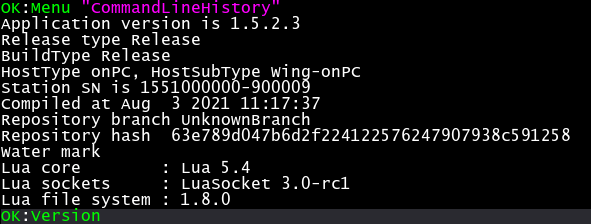
Version details in the command line history window
The version details are displayed in the command line history window.