Quick Start
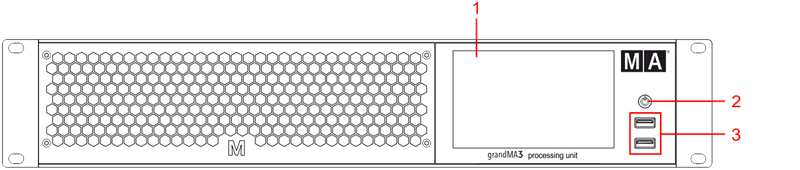
grandMA3 processing unit M, L, XL front panel
- Internal command multi-touch screen
- Power key
- USB 2.0 (type A)
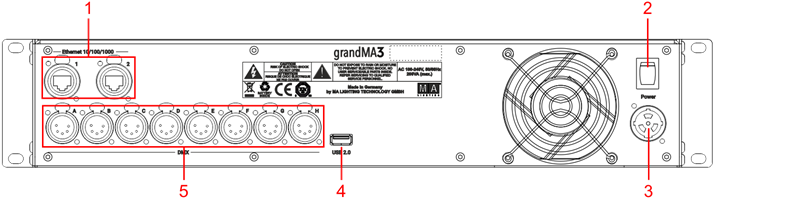
grandMA3 processing unit M, L, XL rear panel
Turn on the grandMA3 processing unit
Section titled “Turn on the grandMA3 processing unit”- Unpack the device.
- Remove the packaging and cushioning material.
- Place the device indoors on a stable surface.
- Connect an external keyboard and mouse to the grandMA3 processing unit using the USB ports.
- Connect the grandMA3 processing unit with your PC, laptop, or a grandMA3 console using an etherCON/RJ45 connector.
- Insert the powerCON TRUE1 plug into the corresponding socket.
- Connect the main power plug.
- Turn on the power switch (set it to position I.)
- The power switch lights up in red.
- Press the power key on the front panel.
The device starts booting.
The Mode Selection dialog appears:
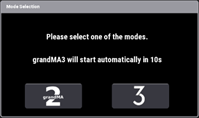
- Tap to select a mode.
Turn off the grandMA3 processing unit
Section titled “Turn off the grandMA3 processing unit”- Press the power key on the front panel.
A warning pop-up appears:
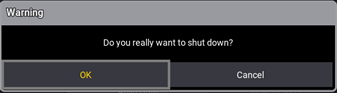
- Tap OK.
The grandMA3 device shuts down. - Set the power switch to position O.
 | Important: You can disconnect the grandMA3 processing unit using the grandMA3 console or the grandMA3 onPC software. The DMX output will then be immediately interrupted. |
Update the software
Section titled “Update the software”- To update a grandMA3 device, download the latest software version from www.malighting.com.
The required installer is called grandMA3 Software x.x.x.x. - Extract the zip file “grandMA3_stick_v.x.x.x.x.zip” and copy the folders EFI, ma, and the update.scr file into the root directory of your USB flash drive.
- Insert the USB flash drive in the device’s USB port.
- Shut down the grandMA3 device.
- Connect an external keyboard with a USB port.
- Turn on the grandMA3 device.
- Press the key 8/F8 on the external keyboard several times.
The Boot Manager opens. - Scroll down to EFI USB Device using the arrow keys.
- Press Enter on the external keyboard.
The grandMA3 device starts to boot. - Follow the onscreen instructions during the update process.