MAtricks and Shuffle
MAtricks is a tool that can be used to divide a selection of fixtures into sub-selections.
The general workflow involves selecting fixtures and applying different MAtricks settings to them within the primary selection.
For example, ten fixtures are selected, and you want to step through them one at a time to correct their positions. MAtricks is the tool used for this purpose.
The selection can be shuffled using a set of shuffle tools. Read more below.
MAtricks Tools
Section titled “MAtricks Tools”One way to work with MAtricks is through the MAtricks toolbar or window.
The MAtricks tools are available in a window that can be created like any other.
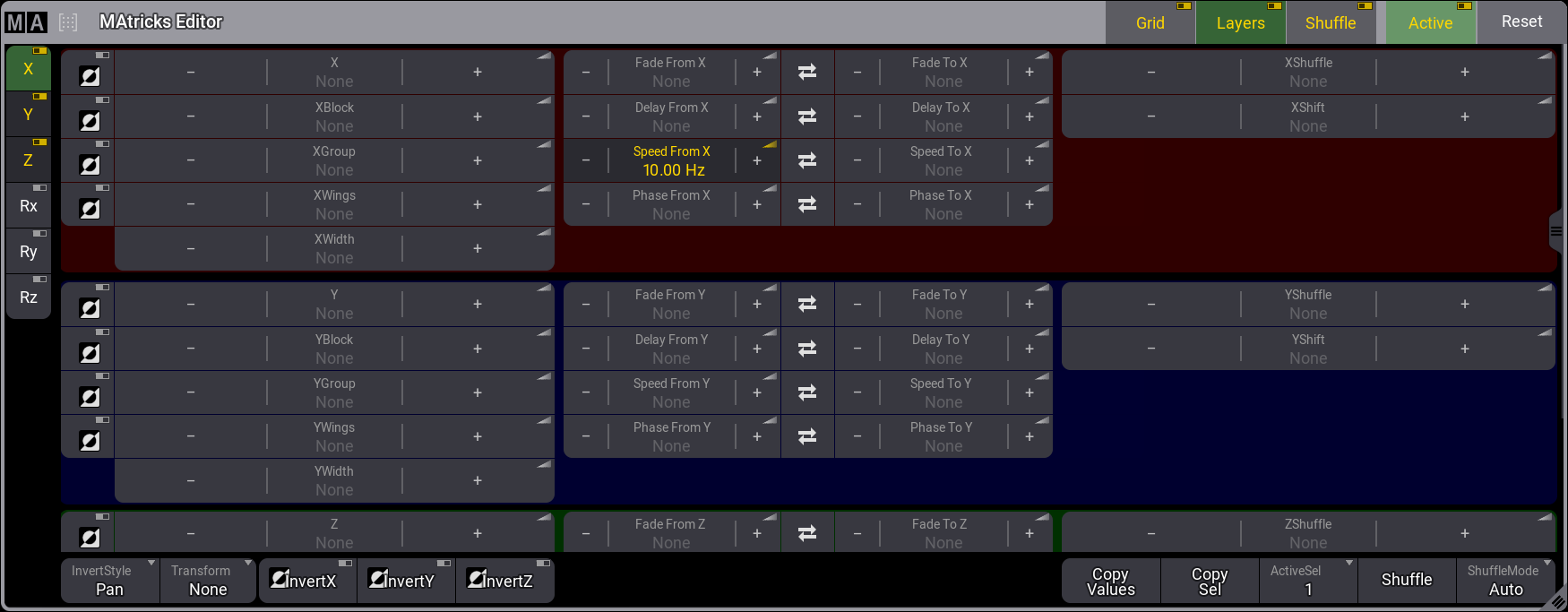
A menu version of the MAtricks window can be opened by tapping MAtricks in the Encoder bar.
The two versions have the same buttons and options. The following topics provide details about the different options.
Tap Grid, Layers, or Shuffle to display or hide the corresponding group in the title bar.
The MAtricks window is divided into three sections, one for each axis. The X-axis section has a red background, the Y-axis section has a blue background, and the Z-axis section has a green background.
Tap X, Y, or Z in the toolbar on the left side to display or hide the corresponding axis.
Each axis section has its properties grouped.
Here are the groups and their properties:
- Grid: Axis (X, Y, Z), Block, Group, Wings, and Width.
- Layers: Fade From/To, Delay From/To, Speed From/To, and Phase From/To. Tap
 between the input fields to swap the from/to values.
- Shuffle: Shuffle and Shift.
The Layers**** speed readout format can be set to Hz, BPM, or Seconds in the User Profile. See User Settings.
For the following example, the speed readout format is set to Hertz.
To apply the speed value of 10Hz to the Speed From X property of the selection MAtricks using the command line, type:
 | User name[Fixture]>Set Selection MAtricks “SpeedFromX” 10 |
This is the result: