System Colors
After some actions, the dot2 gives you directly feedback in color form.
The following examples will explain it.
Gray Color
Section titled “Gray Color”
Figure 1: Gray color
Gray color indicates a not selected object. It is the default color.
Yellow Color
Section titled “Yellow Color”
Figure 2: Yellow color
Yellow color indicates a selected object, e.g. fixture or group.
Red Color
Section titled “Red Color”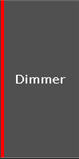
Figure 3: Red color
Red color indicates that this value comes from the programmer and you can store it, e.g. preset type bar or fixtures sheet view.
Purple Color
Section titled “Purple Color”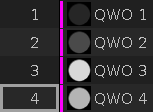
Figure 4: Purple color
Purple color indicates a running effect in the fixtures view or in the title bar of the preset types if the low or high values are visible for effects. In the preset pools it indicates a stored effect.