Call
This page describes the syntax and how to use the Call command.
To go to the Call command press and hold the  key and On on the console.
Call is in the command line, now.
Call
Description
Section titled “Description”With the Call command, you can call:
- Presets from the preset pool into the programmer for all supporting fixtures of these attributes
- The status of a cue as actual output and the values of the cue into the programmer as storable values, but without selecting the fixtures
Syntax
Section titled “Syntax”1. Call a preset from the preset pool into the programmer.
Call Preset 1.1
2. Call a cue.
Call Cue 3
Example 1
Section titled “Example 1”Let´s assume you will call the dimmer preset 1 from the dimmer preset pool (= 1) into the programmer.
Press and hold + On (=Call) and Preset 1 . 1 Please.
The dimmer preset 1 is in the programmer for all supporting fixtures of these preset type.
Hint:
Double check the programmer values in the Fixtures Sheet View.
Example 2
Section titled “Example 2”Let´s assume, you will store a cue 4 (= green background and actor on stage).
The light for actor on stage is currently in the programmer along with the selected fixtures.
Now, you call cue 3 (= green background) to the current selection of fixtures and values into the programmer.
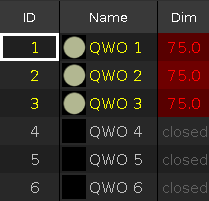
Figure 1: Light for actor on stage in the programmer
Press and hold + On (=Call) and Cue 3 Please.
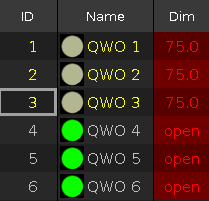
Figure 2: Light for actor on stage and cue 3 values are in the programmer
The cue 3 is called and you see the actual output along with your previous selections of fixtures and their values.
All values of cue 3 are in the programmer and they are storable.
No fixture from cue 3 is selected.
You can still adjust the values of the fixture selection.
If everything looks nice, store cue 4 (=green background with actor on stage) on an executor.