Wizard
The table Channel Function Ranges offers a Color Wheel or a Gobo Wheel Wizard, depending on attribute – color or gobo.
Requirement:
- Add a gobo or a color wheel in the column Attributes.
- To enable the corresponding wizard, click the attribute first.
The following is described on the basis of the on the Color Wheel Wizard.
Open the wizard:
- Click the Color Wheel Wizard after enabling.
- The wizard opens.
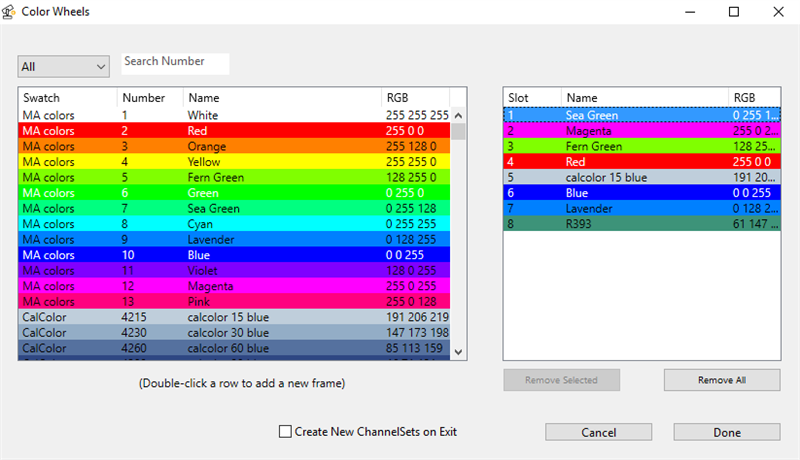
Using the color wheel wizard
- Select the manufacturer by clicking the drop-down list All.
Or display the array of colors by the number:
-Enter the number in the input field Search Number. - To add the colors to the column on the right, double-click a color.
- To remove single colors in the table on the right, click a line to mark it.
Then, click Remove Selected. - The line is now removed.
- If you would like to remove all lines on the right, click Remove All.
- To create new channel sets on exiting the subattributes, check the checkbox Create New ChannelSets on Exit.
Important:
Checking Create New ChannelSets on Exit overwrites all existing function sets of the subattribute.
- If the settings are adjusted, click Done.
- The wizard closes and the settings are now applied.
To abort the operation, click Cancel.