Channel Function Ranges
Channel Function Ranges display the subattributes of the selected DMX channel.
The basic functions will be created automatically in the Function Sets after a DMX channel was added.
It is possible to:
channel function ranges.
- To edit the ranges of the channel function, double-click the cell below a column. The cell is selected and displayed in blue. Type to edit using the keyboard on your PC.
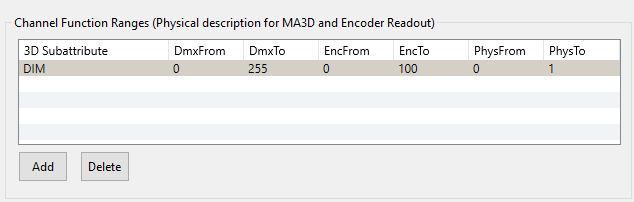
Channel Function Ranges
The table Channel Function Ranges displays seven columns:
- 3D Subattributes: Displays the subattributes to the selected DMX channel.
- DmxFrom: Displays on which DMX value the subattribute starts.
- DmxTo: Displays on which DMX value the subattribute ends.
- EncFrom: Displays the start entry of subattributes.
- EncTo: Displays the end entry of subattributes.
- PhysFrom: Displays the start of the physical range used by the 3D.
- PhysTo: Displays the end of the physical range used by the 3D.