Add channel function ranges
Requirement:
- Select attribute in the table Attributes.
For more information see Attributes.
To add channel function ranges, click on **Add **below the table Channel Function Ranges.
The window Add Channel Function opens.
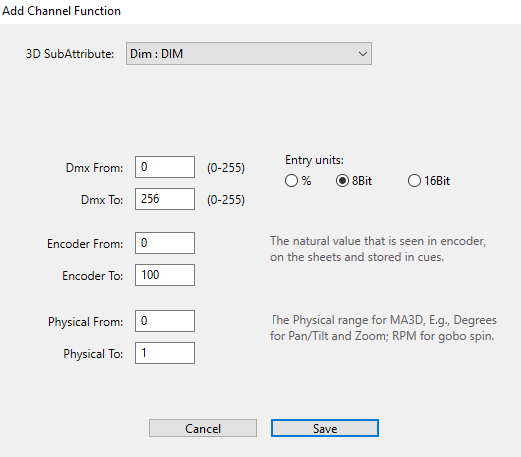
Add channel function ranges
- Select the 3D SubAttribute in the drop-down list.
- Enter the DMX ranges in the columns Dmx From and Dmx To.
- Select an entry unit on the right of the window.
- Enter the encoder ranges in the input fields Encoder From and Encoder To.
- Enter the physical range for the 3D in the input fields Physical From and Physical To.
- To save and close the window, click Save.
- To abort the operation, click Cancel.
The channel function range is now added.
Important:
Please make sure that the DMX channel ranges do not overlap.
For information on how to delete a function in the table see Delete channel function ranges. \